
Animations illustrate geometry rather than exact app screens. Browser 0.4 uses the new modeling tools; Windows remains 0.3. Check version differences and project compatibility.
Useful first: Understand safe clearance · Recognise the main cutter shapes

V-carve uses the filled regions of imported artwork. Local artwork width and the selected V-bit geometry determine the depth, within the chosen limits. Inner holes in the artwork remain protected. This differs from following a centreline at a fixed depth.
Try it in Cadivari
Import the practice artwork
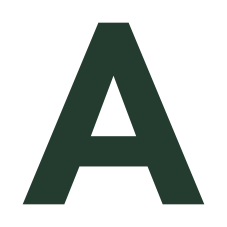
Download the letter A SVG from the exercise below. In a Top-plane sketch, choose File → Import SVG artwork… and select it. Check its declared 60 × 60 mm page, then choose Add to drawing.
Prepare the filled region
Select the grouped artwork in CAD and click Prepare V-carve. In CAM, confirm Source mode is V-carve. The supplied file has one filled region and one triangular inner hole, with no separate strokes.
Inspect the cutter and limits
Choose a V-bit and review its included angle, tip diameter and maximum diameter. Inspect Maximum depth and Cut width limit, plus stock, clearance and cutting parameters. These limits cap the result rather than requiring one fixed cutting depth everywhere.
Create the preview operation
Wait for the artwork analysis and resolve any topology, stock or parameter error. When the preview is valid, click Create V-carve engraving. Keep engraving before any final outside cutout.
Inspect the hole and depth changes
Open 3D and inspect Toolpaths and Material under Simulate. Scrub through a narrow tip, a wider area and the triangular counter. Compare with the G-code preview. The counter should remain uncut; broad areas beyond the selected width limit may remain for a separate clearing operation.
A small exercise
Import the supplied letter A and create a preview V-carve operation. Identify its one filled region and one protected counter, then compare shallow and deeper parts of the engraving.
What you should see
The compound fill retains the triangular inner opening. Tool depth varies with local width and the V-bit geometry, within the depth and width limits.
Things to look out for
- Choose V-carve for filled artwork. Centreline and V-groove modes follow explicit strokes and do not mean the same thing.
- An SVG outline is not automatically a valid filled region. Open, crossing or overlapping boundaries can block preparation.
Check your understandingShould the cutter engrave the triangular hole in the letter A
No. It is a counter inside the compound fill and stays protected. The SVG’s even-odd fill rule identifies it as an unfilled opening.
With JavaScript enabled, you can save lesson completion in this browser.
Go deeper in the knowledge base
- Filled artwork V-carving
- SVG import and scale
- Centreline and V-groove alternatives
- Review before export
Instructions checked against the Cadivari 0.3.0 source and knowledge base on 2026-09-16. Lesson revision 1.